Joksan Flores • 00:06
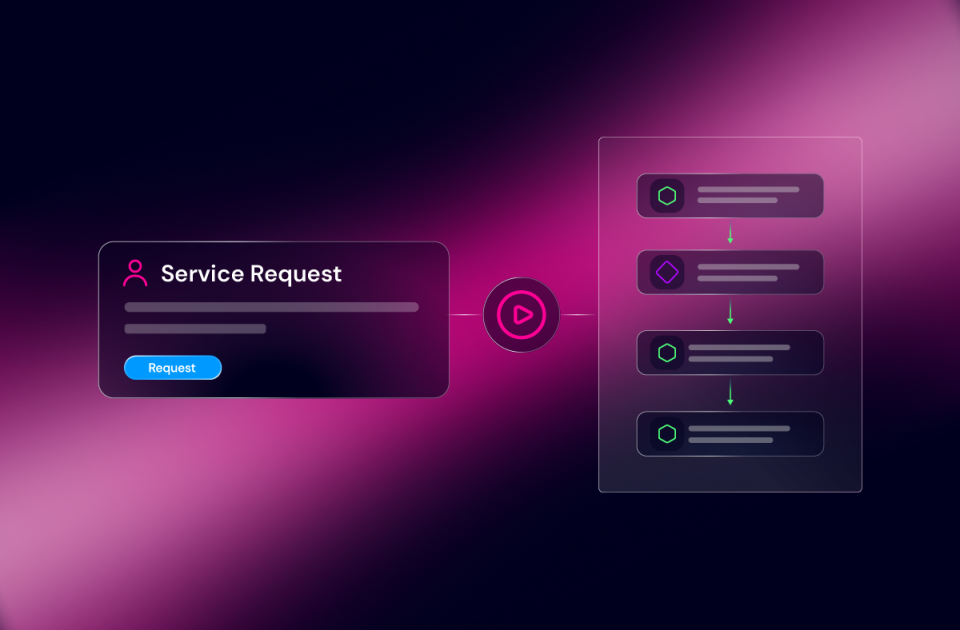
Hi everybody, my name is Joksan Flores. I’m a principal solutions engineer here at Itential, and today I am demonstrating the new service requests capability, which was released in Itential Platform 6.7 release. The service request capability is meant to be a service portal where users can come and request services to provision their network needs. And this is meant to be and presented as a catalog that everybody can come here and visit services they have access to based on their user scoping. All the services that are available here are subject to RBAC scoping and access to the application itself. But again, as I mentioned, it is meant to be a service portal where users can come in and request their services, track their executions, track their recent requests, and so forth. So I’m going to go ahead and do a little bit of a tour around the application.
Joksan Flores • 01:00
We’re going to go ahead and configure a new service as it would have been configured by a new admin, and then we’re going to go ahead and launch a new operation. At the top of the page, it says, you know, welcome, Joksan Flores. The idea here would be that as a user, if I only have access to requesting services, I can just come in here and only see this application and work center perhaps if needed for myself to do any interactions with the automation or agent. At the top, I will see overview. So it shows my recent requests, which I can go ahead and double-click here and it shows everything that I have done. Now, obviously, this is a demo system. So a lot of the requests that I have provisioned have been mostly the same because it’s been throughout testing and so forth.
Joksan Flores • 01:45
Also, I will see the recent services that are here at the bottom of the things that I have requested the most, but I have the ability to show the recent, most recent ones that I have used. The most requested ones, they all show as a catalog form with their service names and descriptions. And I can also click on view all services. And this will show me a card view of all the services by default, ordering and so forth. And I can also request them as a list here as well. So if I had lots and lots and lots of services that were listed here, I could show all of them as well. I can also see services that I have requested in a schedule.
Joksan Flores • 02:22
So, if I have scheduled requests to execute at midnight during a maintenance window or anything like that, if I have to request software upgrades or downtime activities and so forth, they will all show up in here so that I can look at them and modify them. So, we’ll do one of those towards the end. Now, let’s look at how we add new services into this portal. As I mentioned before, this is meant to be an entirely user-operated portal. So, the administration, how these services are created, happens in a separate application called Operations Manager, which has been in Itential for quite a while. And it still retains the responsibility for trigger creation. So, we’re going to go ahead and go into Operations Manager, and we’re going to go and create a new automation.
Joksan Flores • 03:06
So, let’s go ahead and select the type of automation. In this case, I’m going to do agent. I’m going to do cloud security policy assessment. We already have a service that’s ready for that. And I’m going to hit create. That’ll create a new automation entry. It’ll also let me here configure my agent.
Joksan Flores • 03:25
So, we’ll show you how easy it is to do this. I’m going to select my security group assessment agent version 2. Once that is done, I am going to create a trigger. And this is the part that’s important here. The trigger itself, when set up as manual, is what shows up, is what triggers the creation of a new service in service requests, as long as it’s scope for RBAC. So, what we’re going to do is I’m going to put a service name in here, and I’m going to call it security group assessment, or I will say cloud security policy assessment. I’m going to put a new description, and this is what will show up in the catalog.
Joksan Flores • 04:06
So, very important to put an accurate description here so that our users know what they’re requesting properly, if there’s any caveats and so forth. This will execute a security policy assessment across all configured landing zones and send a report to the configured recipients. If I can type, there we go. Assessment, we got a typo there. Perfect. And we have selected this as manual already. Since we have already created our agent or a workflow form in Studio, we will auto-render the inputs for this based on that.
Joksan Flores • 04:52
In this case, this is an agent that has variables defined on it, and it’s defined only recipients as a string. So that is all perfect. Well and done. I’m going to go ahead and save that. And now I can also set up RBAC for this. So if I wanted to only restrict the admin group here, I can restrict the admin group for this as well. If I only wanted to restrict the users,
Joksan Flores • 05:16
I can restrict the user. So I’m going to do a user’s and admin for now so that they all can see it. Now that means that anybody that comes in either through their preferred or the organization’s IDP in Okta or Ping ID, Azure, Andra, etc., can do read and write for those groups, can do read for those triggers or for those services rather. And I’m going to do the same thing here. And this is a very important step here. When we create these triggers, this is the R back that will scope what the users can see in service requests. So an extremely important step.
Joksan Flores • 05:49
So we’re going to go ahead and save that. And we’re going to go back to our service request application. And now, as you can see, my cloud security policy assessment has showed up in here because my permissions allow it. So if I were to go to view all services, it’ll show up in here and it’ll show up on my list. So let’s go back ahead and go ahead and request that. So we’re going to do a couple of things. Let’s go ahead and do a schedule 1st .
Joksan Flores • 06:11
So we’re going to do joxin.flores at intentional.com. I’m going to go ahead and put this on a recurring schedule. I’m going to do a daily schedule, and we’re going to do it on Mondays at let’s say 1 to 2 a.m. And next occurrence just starts at the next occurrence and ends after one occurrence or let’s say three occurrences. So we’re going to go and create that schedule. That’s all done. I can come here and modify it and so forth.
Joksan Flores • 06:42
I’m not going to go ahead and look at that again right now. Let’s just go back into the scheduled request. Here we go and see that my schedule has been set up and configured. It’s got the frequency in here. It has the days. If I need to go modify it, I can go ahead and modify it. I can disable it.
Joksan Flores • 06:58
I can stop it. So that’ll mean that’ll turn off the next run. I can go ahead and enable it again and I can go and set up the days that it has to be that it will run into. So I can go back and uncheck and say, I’m just going to do it. Let’s say Monday. There you go. Perfect.
Joksan Flores • 07:14
So now it’ll happen every Monday at 2 UTC instead of what I did before. And it also has got the input configuring here, which is my email in this case. If it had static inputs set up, I can go back and schedule those. So this will serve as a place to kind of trigger, you know, query or schedule rather those recurrent operations as well as schedule one-time operations as well. I’m going to go and save that. And then we’re also going to go back into cloud security policy assessment. No, not this guy.
Joksan Flores • 07:40
We’re going to go back into overview and go back and we’re going to request a one-time thing. Toxin.flores.com. And we’re just going to go ahead and request that. Since this is an entirely headless portal for the process, or it’s just a user portal, what the user will see is that they will show in here just the status of their request. There is an agent session here that I can go and forward to if I wanted to, if I had the permissions. Users that don’t have permissions won’t see this portion of it. They’ll just see in progress, last updated now, and they will see their input.
Joksan Flores • 08:19
And if they wanted to see JSON for some reason here, they could do that as well. They could copy that session to the clipboard. In addition, while that is progressing, users could come in here and look at their existing or their past requests, like this SSID provisioning service, and they could click on here and say request again, which is very useful for people that just need to request multiple services. Imagine that. You’re an operator requesting multiple SSIDs for an event, or you need to request multiple port turnups in a day, and your automation does not allow for that to happen at scale. You’re just going to do them one at a time. You could come and say request again, and then just modify the one value that you need to modify, and everything else stays the same.
Joksan Flores • 09:04
So, extremely useful capability there for kind of that reusability of those services. So, we’re going to go back and look at my service request homepage again. I got in my recent request. I can see now that my cloud security policy assessment has an open work center activity. If I have access to work that, I will work that. In this case, I have it. We have an AWS security group review in this case, and it’s found a bunch of stuff and all that.
Joksan Flores • 09:30
We’re just going to go and finish this without changes. And going back to my service request. My request is in progress, and at some point when it finishes, it’ll show the update out here. So it just finished. It just showed that it’s complete. I got the input still showing up in here. I got the output.
Joksan Flores • 09:49
It says, hey, this is the entire summary of the execution. It sent a report to Jackson: 42 issues, 62 warnings, canceled something, you know, some other stuff. No fixes were selected. And then I can also show a side-by-side of the input and output of the operation. Again, this was a demo of the service requests capability in Tensor Platform 6.7, where users can come and request their services. Builders can come and configure their trigger and expose things in a very quick way. You saw me do it.
Joksan Flores • 10:20
It took me less than a minute to go and create a new service and expose it to users for their self-service requests. Thanks for tuning in.


 Build Build agents & workflows visually, with AI, or bring your own.
 Integrate Connect every system, tool, agent, & AI in your stack.
 Execute Execution for agentic & deterministic operations.
 Secure & Govern Govern every action with built-in RBAC, audit & approval gates.
 Operate Self-service operations & real-time visibility.











 Agentic Operations Connect AI to infrastructure for trusted, automated actions.
 AI Vulnerability Response Discover & remediate critical vulnerabilities at machine speed.
 Infrastructure Modernization Transform legacy networks into modern, AI-ready infrastructure.
 Infrastructure as a Product Deliver network and infrastructure services on demand - self service, governed, & consumed like cloud.
 Hybrid & Multi-Cloud Orchestration Unify hybrid & multi-cloud infrastructure through agentic orchestration.
 Unified Change Management Unify network & infrastructure changes across every team, tool, & domain.