Itential logo
Blogs

Getting Started with Itential MCP in OpenAI Platform Agent Builder

Headshot of Ankit Bhansali, Principal Architect of AI Solutions and Strategy at Itential, designing automation and orchestration solutions for complex networking challenges.
Ankit Bhansali
Principal Architect – AI Solutions & Strategy

Key Points

  • In this guide, you’ll learn how to set up the Itential MCP Server, connect through the OpenAI Platform Agent Builder, build agents, auto-discover MCP tools, and test your agent.

Overview

The Model Context Protocol (MCP) is rapidly becoming the universal standard for connecting AI assistants to real-world tools, APIs, and infrastructure. Thanks to its standardized JSON-RPC interface, MCP enables any AI agent to securely discover and use external capabilities without specialized integration logic. Itentialu2019s MCP Server brings enterprise-grade network and infrastructure automation to MCP-aware AIs including OpenAI, Microsoft Copilot, Microsoft Copilot Studio/AI Studio, Anthropic, Google Gemini, and more. This guide walks you through end-to-end setup, including:

  • Installing and running the Itential MCP Server
  • Configuring authentication (OAuth, Basic Auth)
  • Integrating MCP inside OpenAI Agent Builder
  • Auto-discovering Itential tools and resources
  • Creating an OpenAI Agent with MCP
  • Testing your agent with real Itential platform interactions

Outcome

By the end, you’ll have a functioning OpenAI agent that can manage infrastructure with natural language — safely and with full visibility.

Connecting Itential MCP to the OpenAI Platform Agent Builder

OpenAI Agents natively support MCP connections, allowing Agents to securely interact with external systems. MCP servers can be added at the organization level, project level, or per individual agent.

Step 1: Open the OpenAI Platform Agent Builder

Navigate to: https://platform.openai.com/agent-builder Create or open an Agent.

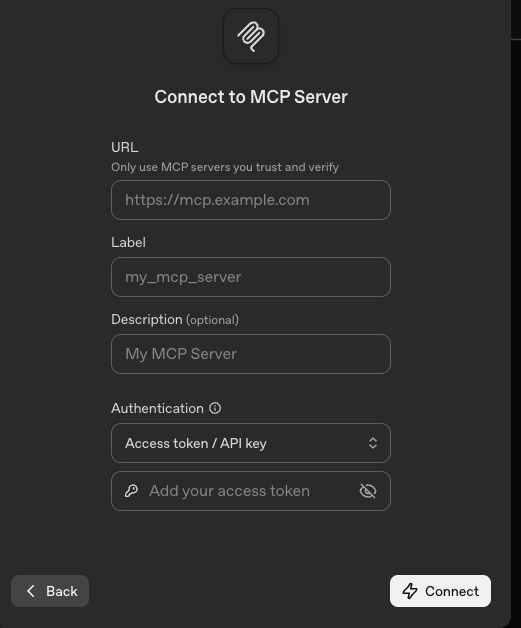
Step 2: Add Your MCP Server

Provide:

  • Server Name (e.g., itential-mcp)
  • MCP URL
  • Authentication Type
  • Credentials / Secret Values

Examples:

Once saved, the OpenAI Agent Builder will automatically load from the Itential MCP Server:

  • Tools
  • Resources
  • Prompts
  • Schemas

No manual tool configuration is required. Your OpenAI agent is now infrastructure-aware. 

Discovering Itential MCP Tools in OpenAI Agents

Go to: Tools MCP itential-mcp You should see actions like:

  • get_health
  • get_devices
  • get_configuration
  • get_workflows
  • run_workflow
  • launch_gm_service

For each tool, OpenAI displays:

  • A natural-language description
  • Input parameters and schema
  • Output schema

These schemas allow the agent to reason about required inputs, validate requests, and safely execute actions against the Itential Platform. Agents are now automatically capable of calling these tools.

Creating an MCP-Enabled OpenAI Agent

Within the Agent Builder:

1. Create a New Agent

In the OpenAI Agent Builder:

  • Assign a name (e.g., Itential Infra Agentu201d)
  • Provide a description (agent purpose)
  • Add your Itential MCP Server under Tools

2. Enable Tool Auto-Discovery

When an MCP server is attached, OpenAI automatically:

  • Detect tools
  • Generate schema-based actions
  • Infer tool usage from natural-language prompts

No additional configuration is required.

3. Define the Agent Persona

Add persona instructions to control agent behavior, including:

  • Role and responsibilities
  • Safety and governance boundaries
  • Confirmation requirements before executing actions
  • Escalation or approval rules

This ensures the agent behaves predictably and operates within enterprise policy. A sample persona template is provided at the end of this guide.

Testing Your Itential-Powered OpenAI Agent

Use the Test Console in the OpenAI Agent Builder to validate real interactions.

Device Health and Analysis

Open the Test Console in Agent Builder and try: Prompt: “Check the overall health of the network.”

Result:

  • Platform and device health status
  • Detected issues and warnings

Inventory Discovery

Prompt: u201cList all devices in the Atlanta datacenter.u201d Result:

  • Device inventory
  • Interface details
  • Associated metadata

Workflow Discovery

Prompt: u201cShow all available workflows in the Itential Platform.u201d Result:

  • Available automation workflows
  • Descriptions and parameters

Configuration Retrieval

Prompt: u201cRetrieve the running configuration for router R1.u201d Result:

  • Live configuration data returned from the platform

Persona-Based Dynamic Binding

MCP enables agents to dynamically bind tools and services based on intent and persona constraints.

Prompt: u201cLaunch the AWS EC2 inventory service for us-west-1.u201d

Execute a Workflow

Prompt: u201cRun the Port Turn Up workflow.u201d If required parameters are missing, OpenAI automatically prompts for clarification before execution.

Conclusion

You now have a fully MCP-integrated OpenAI Agent that can:

  • Discover Itential tools automatically
  • Query infrastructure
  • Retrieve device configurations
  • Execute governed workflows
  • Reason with full schema-awareness
  • Stay within RBAC boundaries

Now that you have your MCP-powered OpenAI Agent ready, hereu2019s a few things you can do next:

  • Build custom prompts for common operational tasks
  • Add additional Itential tools for specialized workflows
  • Publish your OpenAI agent to Teams or internal portals
  • Share your MCP configuration with your automation team
  • Explore: https://github.com/itential/itential-mcp
Headshot of Ankit Bhansali, Principal Architect of AI Solutions and Strategy at Itential, designing automation and orchestration solutions for complex networking challenges.
Ankit Bhansali is a Principal Architect – AI Solutions & Strategy at Itential. Drawing on a strong research background in software and networking, he designs innovative solutions to address the industry’s most complex challenges. His strategic approach empowers businesses to achieve transformative growth through robust automation and end to end orchestration.
Keep Learning

The Latest in Agentic Operations

Get Started

Agentic infrastructure operations starts here.

See how Itential connects AI reasoning to governed execution across your entire infrastructure.

Talk to our Experts